What is a CRM for Small and Mid-Sized Businesses?
A CRM (Customer Relationship Management system) is software that helps businesses manage leads, track customer interactions, and organise sales in one central system.
It gives teams clear visibility into their pipeline, improves follow-up consistency, and creates a more predictable path to revenue growth.
What does a CRM do?
A CRM allows businesses to:
- Store all customer data in one place
- Track emails, calls, and messages
- Manage sales pipelines
- Assign tasks and follow-ups
Why growing businesses struggle without a CRM
If you run a small or mid-sized business, your customer data likely sits in multiple places. Spreadsheets, inboxes, WhatsApp chats, and sometimes even on someone’s phone.
It may feel manageable at first. But over time:
- Leads get missed
- Follow-ups become inconsistent
- Pipeline visibility becomes unclear
The right CRM brings structure, accountability, and clarity to your sales process.
What you’ll learn in this guide
In this guide, we’ll cover:
- What a CRM is and why small businesses need one
- How a CRM helps manage sales and customer relationships
- What features to look for in a CRM
- How to choose the right CRM for long-term growth
This guide is designed for growing small and mid-sized businesses in the Asian region looking to organise sales and scale more effectively.
1. What a CRM Really Is and Why Small and Mid-Sized Businesses Can’t Grow Without One
CRM Definition: A CRM, or Customer Relationship Management system, is business software that centralises customer data, tracks sales activity, and manages interactions across email, calls, messaging apps, and meetings in one shared platform.
It also makes managing sales and customer relationships far more organised. You can see where each deal stands, who’s responsible, and which actions are overdue.
Instead of:
- Contacts scattered across spreadsheets, email address books, and personal phones
- Sales notes stuck in someone’s head (or scribbled on paper)
- Messages coming in from email, WhatsApp, WeChat, and social media with no clear tracking
…a CRM brings everything together into a single, shared view your whole team can rely on.
2. What problems does a CRM solve?
- Lost leads: Without a system, enquiries from forms, calls, or messages can easily be forgotten or left without proper follow-up.
- No clear overview of sales: It becomes difficult to answer basic questions like: “How many deals are in the pipeline?” “Which opportunities are close to closing?” “What revenue can we realistically expect?”
- Inconsistent follow‑up: Some prospects get quick replies, others wait days. Some get regular follow‑ups, others hear nothing.
- Dependence on one or two key people: When customer information sits in one person’s inbox, phone, or memory, the business becomes vulnerable if they are unavailable.
For most small and mid-sized businesses, their CRM doesn’t need to be complicated. At its core, it’s simply a central place to store your contacts, companies, and deals. And that alone solves a lot of common headaches.
3. What features does a good CRM have?
Popular CRM platforms for small and mid-sized businesses include HubSpot CRM, Salesforce Sales Cloud, Zoho CRM, and Pipedrive. Each offers different strengths depending on budget, complexity, and integration needs.
The “best” one depends on your situation, but there are some core features you should not compromise on.
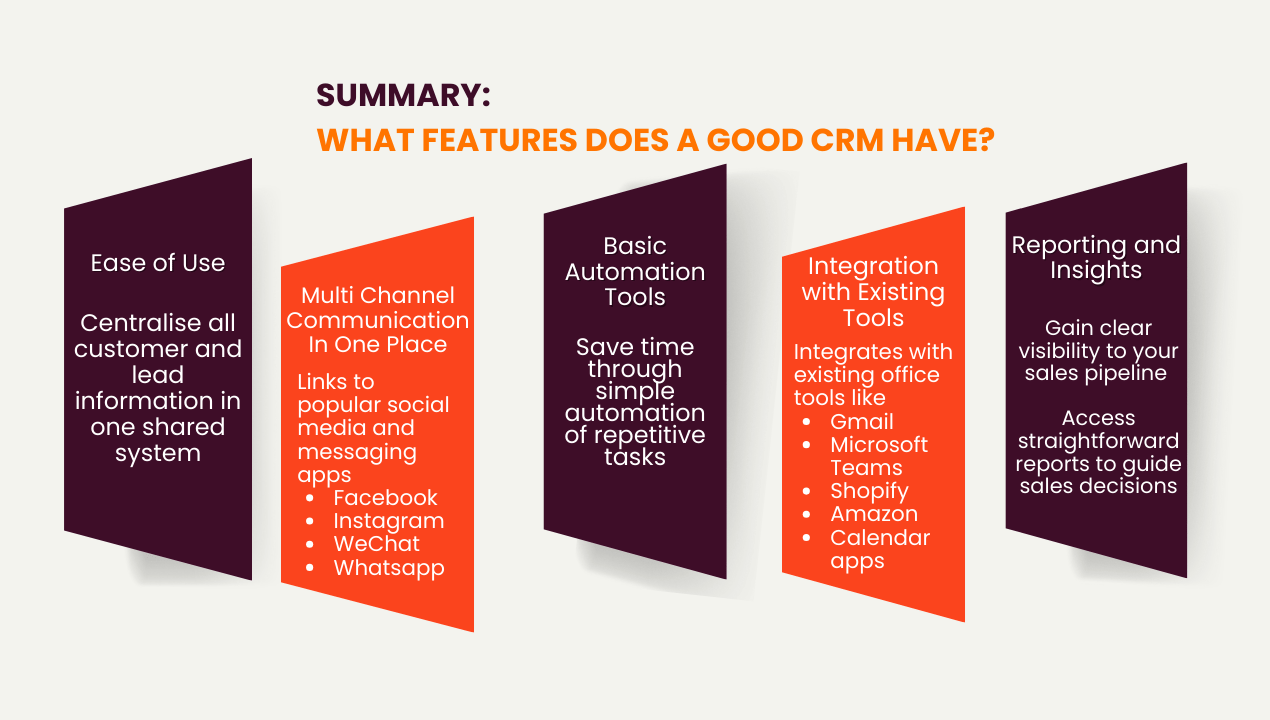
1) Ease of Use
A CRM should be simple and intuitive so your team can adopt it quickly.
Look for:
-
Clean interface
-
Easy navigation
-
Quick data entry
If a system feels confusing during the demo session, adoption will likely be difficult later.
2) Multi‑Channel Communication in One Place
Your customers and leads contact you through many channels, such as:
- Website forms and chat
- Social media
- Messaging apps (e.g., WhatsApp, WeChat)
When conversations are spread across different platforms, it becomes easy to miss a message, reply too late, or lose track of what was discussed previously. Team members may not have the full context, which can lead to repeated questions or inconsistent responses.
A good CRM can help your team respond faster and with more confidence. Just as importantly, you maintain a complete, organised history of every customer interaction, which makes future conversations much easier and more professional.
3) Basic Automation
Automation often sounds more complicated than it really is. At its core, it simply means letting the system handle repetitive administrative tasks so your team can focus on real conversations and relationship building.
For example, your CRM should be able to:
- Send a welcome email when someone fills in a form
- Assign a new lead to the right person based on region, product, or channel
- Create reminders for follow‑up after a few days
- Move a lead to a new stage in the pipeline when certain conditions are met
You do not need advanced AI or complex workflows to get started. Even simple automation can significantly improve efficiency.
4) Integrations with Your Existing Tools
A CRM should act as a central hub, not a standalone system. It should integrate with:
- Email platforms (e.g. Gmail, Outlook)
- Calendar tools
- Website and landing pages
- Marketing and messaging tools
This reduces manual work and keeps all data connected.
5) Clear, Useful Reporting
A CRM should help you answer key business questions quickly.
Essential insights include:
- Number of new leads
- Lead sources
- Response time
- Conversion rates
- Pipeline value
Reporting should be simple, clear, and actionable. It should also make it easy to filter and segment your data so you can see what is working and what needs attention.
If reporting feels confusing or makes it difficult to find these simple insights, it becomes much harder to use your CRM as a tool for real improvement rather than just record-keeping.
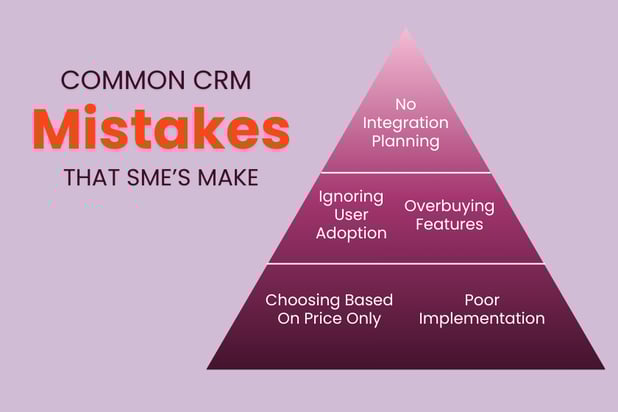
However, many CRM projects still underperform due to avoidable mistakes.
Here are some common (but easily avoidable mistakes) SMEs make during implementation. For a more detailed summary, check out our related article on "6 Common CRM Mistakes".
4. How do you choose the right CRM for long term growth?
A CRM is not just a contact database. For a growing business, it becomes the operational backbone of sales, marketing, and customer management. The earlier you implement the right system, the easier it becomes to scale without losing visibility or control.
If you are evaluating CRM options or considering HubSpot, working with an experienced implementation partner can make the difference between a smooth rollout and months of rework.
At NetFarmer, a HubSpot Platinum Solutions Partner, we help growing businesses design and implement CRM systems that are practical, scalable, and aligned with real sales processes. If you would like guidance on choosing or setting up the right CRM for your business stage, you can connect with our team or set up a call here.
Frequently asked questions about CRM systems
Is a CRM worth it for small businesses?
Yes. Even small teams benefit from better organisation, improved follow-up, and clearer visibility into sales.
What is the best CRM for small businesses?
The best CRM depends on your needs, but it should be easy to use, scalable, and integrate with your existing tools.
Can a CRM integrate with messaging apps?
Many modern CRMs support integrations with platforms like WhatsApp and other messaging tools to centralise communication.
How much does a CRM cost?
Costs vary widely. Many CRMs offer free or entry-level plans, with pricing increasing based on features and team size.
Do I need a complex CRM to start?
No. Most small businesses benefit from starting with a simple setup and adding features as they grow.
.png)