Connecting WeChat and WeCom to HubSpot can help your team manage customer conversations without losing the CRM context behind them. But “integration” for your messaging channels can mean several things: creating contacts, displaying messages, replying from HubSpot or linking a conversation to a support ticket.
Let's explore the type of connectors and whether it supports your accounts and the work your team needs to do.
3 different types of sync/integrations to HubSpot
HubSpot supports external messaging through its custom channels API, either through existing Marketplace apps or a custom integration.
There are three different things to distinguish:
- A HubSpot supplied channel connection, where HubSpot provides the channel functionality.
- A third party connector, where another supplier provides the bridge into HubSpot.
- A custom integration, where developers build and maintain the connection for your requirements.
Using a HubSpot API does not, by itself, make a connector a HubSpot supplied product.
MsgBox, built by NetFarmer offers a practical starting point. We provide practical connector solutions for WeCom customer service and WeChat Official Account customer service messages in HubSpot Inbox, alongside conversation history and connect the replies to HubSpot contact cards.
What can sync between WeChat, WeCom and HubSpot?
The scope depends on the account, connector and configuration. For MsgBox, the published capabilities include customer service messaging, contact related conversation history and links between messages and tickets. Its shared data listing also includes contacts, conversations and message files.
Here is a checklist of capabilities that you may need for these types of connectors.
|
Area |
What to confirm |
|
Contacts |
Which details create or update a contact, and how duplicates are handled |
|
Conversations |
Which incoming messages appear, where they appear and whether agents can reply |
|
Attachments |
Supported images, documents and other file types |
|
Historical data |
Whether earlier conversations can be imported, and from which date |
|
Sync direction |
Which data moves into HubSpot, which moves back and which remains unchanged |
Consider MsgBox for your HubSpot portal.
MsgBox brings multiple messaging channels, including WeChat, Doyin, WhatsApp and TikTok, into one centralised dashboard.
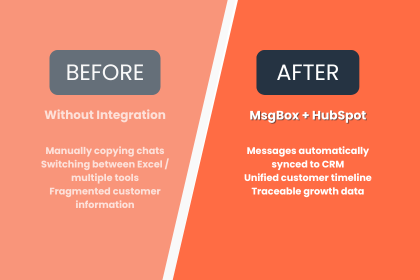
By integrating with HubSpot CRM, it allows businesses to manage customer conversations, capture leads and track interactions in one place. With features such as AI-powered Chinese-English translation, automated replies and chatbot support, MsgBox helps businesses streamline communication, improve response times and ensure no potential customer slips through the cracks.
How can MsgBox help sync messages to HubSpot?
MsgBox’s clearest strength is context: bringing supported conversations closer to the contact records and tickets your team already uses.
Manage supported messages in HubSpot Inbox
MsgBox lists integration of WeCom customer service and WeChat Official Account customer service messages into HubSpot Inbox. For teams already working in HubSpot, this offers a way to handle those supported interactions without treating them as a separate communication stream.
Read and reply beside the contact record
MsgBox displays communication history on the contact details card and supports replies directly within that card. That can make a practical difference when an agent needs to understand the customer before answering, rather than piecing together the conversation elsewhere.
Connect conversations to support tickets
Tickets can link to specific messages, with associated messages visible in the ticket card. For example, a customer’s product query could remain attached to the resulting support case, giving the next person handling it a clearer starting point. This is an illustrative use case, not a customer case study.
What should you check before choosing an integration?
Confirm five things before approving the scope.
- Account eligibility.
Specify personal WeChat, WeChat Official Account or the relevant WeCom communication route. Do not assume support for one includes the others. - Connection type.
Establish whether you are buying a HubSpot supplied connection, a third party product or custom development. MsgBox is a third party app built by NetFarmer and requires its own subscription. - Contact matching.
Ask how messaging a contact links to an existing HubSpot contact. Test missing email addresses, duplicate records and uncertain matches. - Authorisation and revocation.
Confirm who grants access, which data is covered and what happens when access is withdrawn. Include any applicable conversation archiving and consent requirements in the assessment. - Failure handling and maintenance.
Agree who monitors errors, retries failed updates and maintains the integration after platform changes. These responsibilities belong in the proposal, not just the support conversation after launch.
Frequently Asked Questions
Is WeChat integration native to HubSpot?
HubSpot supports external messaging through its custom channels API and points users towards Marketplace apps or custom development for channels such as WeChat. That does not make every WeChat connector a HubSpot supplied product. Confirm who publishes the app, who supports it and which subscriptions the proposed setup requires.
Can MsgBox connect WeCom conversations to HubSpot?
MsgBox’s Marketplace listing specifically describes WeCom customer service messages entering HubSpot Inbox. It also describes conversation history on contact cards and ticket links. Confirm the precise WeCom communication route during evaluation, rather than extending that claim to every employee conversation, group chat or historical message in your organisation’s account.
Does MsgBox support every WeChat account?
MsgBox specifically lists WeCom customer service and WeChat Official Account customer service messaging among its HubSpot capabilities. That should not be read as a guarantee for every personal account, employee chat or group conversation. Ask the team to confirm your exact account type and communication route before agreeing the scope.
Can our team reply without leaving HubSpot?
MsgBox’s listing describes replies directly within the contact details card, alongside communication history. It also lists supported customer service messages entering HubSpot Inbox. During the demo, ask an agent to receive and reply to a real test message through your proposed setup, rather than relying only on a prepared screen.ecosystem.hubspot
Will all our historical messages and attachments transfer?
Do not assume complete historical coverage. MsgBox lists conversation history and message files, but that alone does not define an import period or guarantee every attachment format. Request written confirmation of available dates, supported files, exclusions and storage arrangements, then test a representative sample before signing off on the implementation.
Does “two way sync” include everything?
No. Ask for the direction of each data flow separately rather than accepting “two way sync” as a complete specification. HubSpot’s custom channels API distinguishes incoming and outgoing messages, while its channel configuration separately defines supported outgoing attachments and file restrictions. A broad synchronisation label does not explain those details.
Can attachments sync too?
Attachments need their own test because support is configurable. HubSpot’s custom channels documentation includes settings for outgoing attachment types, permitted MIME types and maximum attachment counts. It also provides a representation for unsupported content.