Most SMEs in Singapore do not fail with CRM because of software.
They fail because they buy Salesforce when they needed something closer to Excel.
More often, SMEs choose CRM platforms that are too complex for their stage of growth, poorly aligned with their sales process, or difficult for their teams to use consistently.
A CRM should simplify how your team tracks leads, manages deals, and builds customer relationships. When implemented correctly, it becomes the central system that connects sales, marketing, and customer support.
This guide provides a practical framework for evaluating CRM options based on your business model, team size, and growth stage.
In this article, you will learn:- Why many SMEs choose the wrong CRM
- The four stages of CRM maturity for growing businesses
- How your business model changes CRM needs
- How team size affects CRM complexity
- A simple 4 step process to shortlist and evaluate CRM options
- Implementing Your CRM Successfully
Why Many SMEs Choose the Wrong CRM
Many businesses begin their CRM search by comparing feature lists.
This is usually the wrong starting point.
Enterprise CRM systems often include hundreds of features designed for large organisations. Smaller companies frequently adopt these platforms only to discover that the software is difficult to configure, complicated for staff to use, and expensive to maintain.
On the other hand, some businesses delay CRM adoption for too long and continue managing sales opportunities through spreadsheets, email inboxes, or messaging platforms.
Both situations create operational problems:
- leads are not tracked consistently
- follow-ups are missed
- leadership lacks visibility into the sales pipeline
- reporting becomes unreliable
Choosing the right CRM is therefore less about selecting the platform with the most features and more about selecting the system that matches your current level of operational complexity.
The 4 Stages of CRM Maturity for SMEs
Most growing businesses move through predictable stages as their sales operations become more structured. Understanding where your company sits on this spectrum helps determine which type of CRM platform makes sense.
Stage 1: Spreadsheet-Based Sales Tracking
At the earliest stage, businesses often manage leads using spreadsheets, email inboxes, or messaging platforms.
Typical characteristics include:
- Founder-led sales
- Small pipeline
- Informal follow-ups
- Customer information scattered across email or chat tools
At this stage, the primary need is basic visibility into leads and deals. A simple CRM that replaces spreadsheets is usually sufficient.
Stage 2: Structured Sales Pipeline
As the business grows, sales opportunities increase and more people become involved in the sales process.
Common challenges include:
- Deals forgotten or not followed up
- Difficulty seeing the status of each opportunity
- Lack of consistent sales processes across the team
CRM systems at this stage should focus on:
- Visual sales pipelines
- Contact and company records
- Activity tracking
- Task reminders and scheduling
- Basic reporting
For many SMEs, this is the point where CRM adoption delivers the most immediate productivity gains.
Stage 3: Sales and Marketing Automation
Once lead volumes increase, companies start looking for ways to automate repetitive processes.
Typical needs include:
- lead routing to sales representatives
- automated follow-ups
- marketing campaign tracking
- lead scoring
- lifecycle stage management
This stage requires a CRM platform that can connect marketing activities with sales pipelines.
Businesses that operate across digital channels such as email, social media, and websites benefit from CRM platforms that provide integrated marketing automation.
Stage 4: Revenue Operations Platform
Larger SMEs and scaling organisations eventually require deeper operational visibility.
This often includes:
- Multi-team collaboration
- Advanced workflow automation
- Revenue forecasting
- Regional management
- Customer lifecycle analytics
- Integration with finance, ecommerce, and ERP systems
At this level, CRM platforms become the central data layer of the organisation, connecting sales, marketing, service, and operations teams.
Understanding which stage your business is currently in helps avoid implementing systems that are either too simple or unnecessarily complex.
How to evaluate CRM features based on your business model
The type of business you run also affects which CRM capabilities are most important.
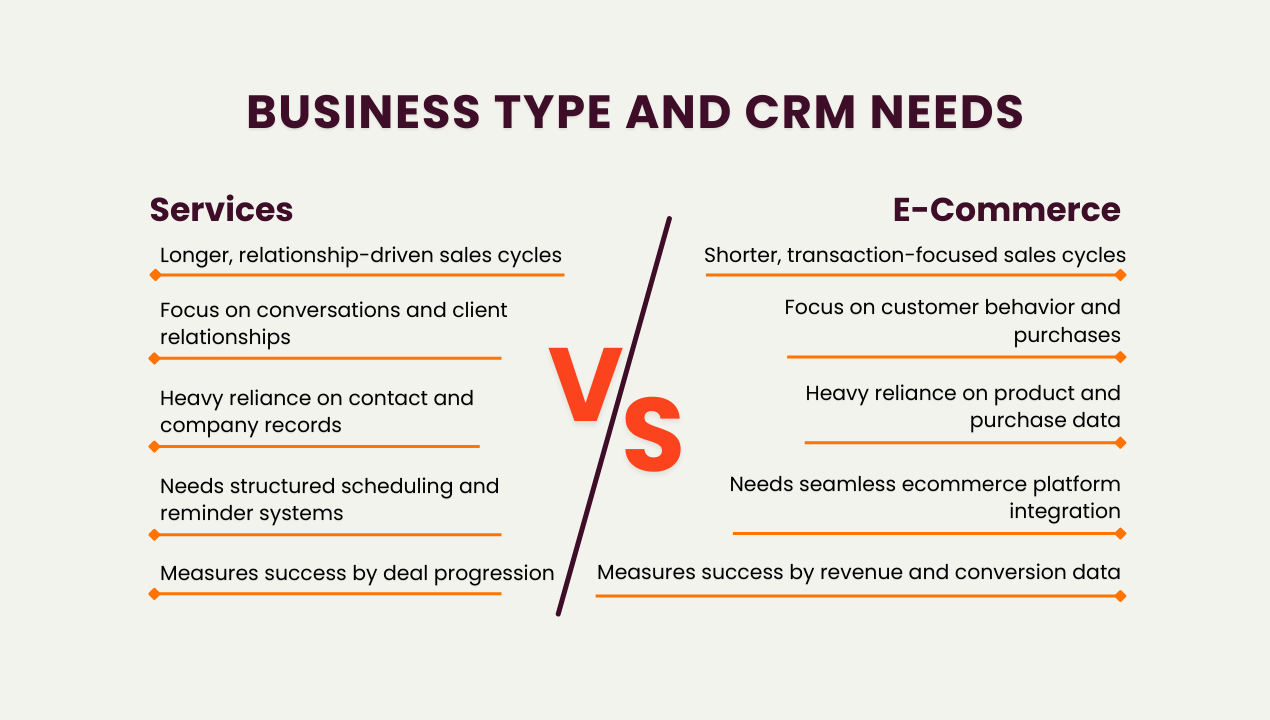
Services Businesses
Examples include agencies, consulting firms, professional services providers, and B2B service companies.
These businesses typically have:
- Longer sales cycles
- Relationship-driven selling
- Multiple conversations before closing deals
- Custom proposals and negotiations
For services companies, CRM platforms should prioritise:
- Detailed contact and company records
- Meeting notes and interaction history
- Deal pipeline tracking
- Reminders for follow-ups
- Email integration
In this environment, the CRM functions primarily as a relationship and opportunity management tool.
E-commerce and Product-Led Businesses
Companies selling products or subscriptions usually experience shorter sales cycles and higher lead volumes.
Their CRM priorities often include:
- Purchase history tracking
- Website behaviour insights
- Marketing campaign attribution
- E-commerce platform integration
- Automated marketing workflows
In Southeast Asia, many ecommerce brands rely heavily on messaging platforms such as WhatsApp Business, WeChat, Xiaohongshu, Instagram, and Facebook Messenger. However, research shows that only 28% of organisations actively enrich CRM data using third-party sources. [Source: Validity]
Hence, it is important to look for a CRM that connects easily to your e-commerce platforms, ties into existing work tools and gives you good visibility into customer purchase history and behaviour.
How Team Size Influences CRM Complexity
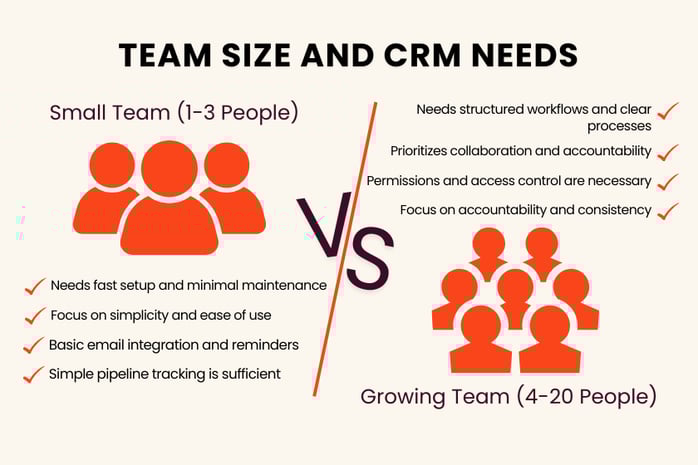
Another important factor when choosing a CRM is the number of people involved in sales and customer management.
Solo Founders or Small Teams (1–3 People)
Very small teams benefit from tools that are quick to set up and easy to maintain.
Key priorities include:
- Ease of use
- Simple pipeline tracking
- contact management
- Basic email integration and follow‑up reminders
At this stage, simplicity is far more important than advanced automation.
Growing Teams (4–20+ People)
As the team expands, collaboration becomes more important.
CRM platforms should support:
- Assigning owners to contacts and deals
- Permissions and access control
- Shared reporting dashboards
- Consistent sales stages
- Automated lead routing
Automation begins to provide meaningful value here because it ensures that leads are handled consistently across the team.
Bonus: Matching to Your Budget
Price always matters, but value matters more. Instead of asking only how much the CRM costs, ask whether it will help you close more deals or operate more efficiently. Also consider what happens as you grow. Will pricing increase sharply with more users or contacts? Are essential features locked behind higher tiers?
A good CRM for small to mid‑sized businesses should let you start at a reasonable price, then scale up smoothly as you grow.
A Simple 4‑Step Process to Evaluate and Test CRM Options
Here’s a simple, repeatable process you can use to evaluate which of the diverse CRM options is the best fit for you and your company.
Step 1: Shortlist 3–5 Options
Before you look at any websites, write down:
- How many users you need today
- Your main channels (eg. website, email, and socials such as FB, IG, YT, WeChat, XiaoHongShu etc.)
- Your budget range
Then narrow down your list to CRMs that:
- Fit your budget
- Support your main channels (directly or via integrations)
- Have a good reputation for ease of use
Aim for 3–5 options. More than that becomes overwhelming.
Step 2: Book Demos and Ask Real‑World Questions
For each shortlisted CRM, book a demo or watch a guided walkthrough.
Ask them to show how the system handles your real workflows. For example:
- How does a new website lead enter the system and get assigned?
- How do we track a deal from first contact to closing?
- How can we see all interactions with one customer in one place?
Pay attention to how intuitive the system feels and how clearly the process is explained. After each demo, jot down quick notes on what worked well and what felt confusing.
Step 3: Run a Short Trial
Next, choose 1–3 of your favourites and run a short trial.
During the trial:
- Import a small set of real contacts
- Connect your email and at least one key lead source
- Test everyday tasks like updating leads, moving deals, sending follow-ups, and setting reminders
Involve your team and ask simple questions:
Is this easier than what we do today? What feels unclear? Can you see yourself using this daily?
Step 4: Measure and Decide
At the end of the trial, create a simple scorecard and rate each CRM (for example, 1–5) on:
- Ease of use
- Fit for your business model and channels
- Automation and time savings
- Reporting and visibility
- Overall value for money
You don’t need a perfect system.You need the one that fits your business today and can grow with you tomorrow.
Is HubSpot a Good CRM for Small and Mid-Sized Businesses?
HubSpot is one of the most widely adopted CRM platforms for growing businesses because it combines sales, marketing, and service tools within a single ecosystem.
For many SMEs, this integrated approach simplifies operations and reduces the need for multiple disconnected tools.
HubSpot is often a good fit for companies that:
- Want an easy-to-use CRM interface
- Need marketing and sales tools in one platform
- Expect their sales and marketing operations to scale over time
However, the right CRM always depends on your company’s specific workflows and growth plans.
Implementing Your CRM Successfully
Selecting a CRM is only the first step. Implementation determines whether the system becomes a growth driver or an unused expense. Many businesses start a trial and quickly realise that pipeline design, lifecycle stages, automation rules, reporting structure, and integrations must reflect their real sales process.
This is where working with a certified partner can make a significant difference.
As a HubSpot Platinum Solutions Partner, NetFarmer supports small and mid-sized businesses in selecting, implementing, and optimising HubSpot in a structured and practical way. We help teams choose the right plan based on growth goals and budget, configure pipelines and automations that match real workflows, build reporting dashboards leadership can rely on, and train teams so adoption is consistent.
If you are evaluating HubSpot or reassessing your current CRM setup, you can speak with our team at NetFarmer to explore what a structured implementation would look like for your business.